Home › Workflows › Multi-Disciplinary Rounds › Posting barriers
MDR Rounds: posting barriers
Removing barriers to discharge and patient care, together.
What MDR is
MDR is a daily huddle connecting hospitalists with case management, rehab and therapy, pharmacy, lab, radiology, and nursing leadership, so discharge barriers and patient care issues get resolved in real time.
When: Daily, 0830 start · Where: Exec Conf Room · Remote: Teams
Post your barriers
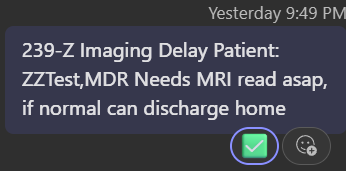
Post each patient barrier in the MDR Rounds channel (in the Hospitalists team) by 0830. One message per patient, one line, in this order: room and barrier type, patient, ask.

Get Teams on your phone

- Download Microsoft Teams from the App Store or Google Play Store.
- Sign in with your Freeman username followed by @freemanhealth.net.
- Enter your standard Freeman password.
- Open the MDR Rounds channel under the Hospitalists team.

Not seeing the channel? Contact Becky Beeler to be added.
How you get answers
The facilitator @mentions the right responder inside your thread, and their answer appears there as a reply.
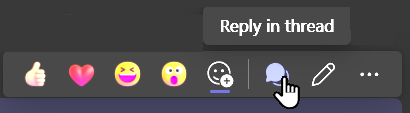
You automatically follow threads you start, so your patients sit in Followed threads at the top of your chat list. Bold means a new reply is waiting. Never scroll the channel to find your post.

The facilitator marks your line with a green checkmark once the loop is closed. If the team needs you live, they will call you on Mobile Heartbeat; after Epic go-live on October 24, Epic Secure Chat replaces Mobile Heartbeat.