
Home › Workflows › Multi-Disciplinary Rounds › Responding
MDR Rounds: responding to patient barriers
How to answer when a discharge barrier belongs to your discipline.
How it works
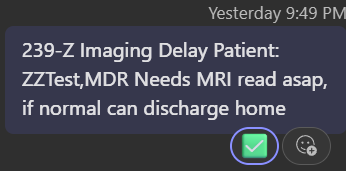
Hospitalists post one line per patient in the MDR Rounds channel (Hospitalists team) before 0830 rounds:
The MDR facilitator @mentions you in a patient's thread when a barrier belongs to your discipline. You'll get a Teams notification. Click it to open the thread.
Responding
Click the notification, hover the patient's line in the channel and click Reply in thread, or click the replies link under the post to jump into the thread.
Reply inside the thread pane that opens on the right. Keep the compose box set to "Send to: thread only" so your answer stays attached to the patient.
Give an answer with a time or plan attached, for example "on the table by 0900, read by 1030", not just an acknowledgment.
If you need an order or something from the hospitalist, call them on Mobile Heartbeat; their line will say "call cell" if they prefer that.



Two rules
Never add the green checkmark reaction. That mark belongs to the MDR facilitator only and means the loop is confirmed closed.
Never reply as a new channel message. Every response goes inside the patient's thread.
Staying on top of your cases
You automatically follow any thread you reply in. Your threads appear under Threads at the top of your Teams chat list, bold when there's a new reply. Check there rather than scrolling the channel.

Questions about the channel go to Becky Beeler.